Ducks for Everything
📦 A playful duck-themed sticker pack with cool, cute, and expressive poses. For reacting playfully, joking around, or adding ducky charm to chats. The 'Ducks for Everything' pack includes 23 stickers for daily chats. Free download to install on WhatsApp.
-

😎 Cool Duck
A duck in sunglasses and a jacket, looking effortlessly cool. For confident, stylish, or laid-back reactions.
-

😠 Stormy Duck
A hooded duck with a sharp, rebellious look. For moodier, tougher, or skeptical reactions.
-

🙂 Plain Duck
A clean, minimal duck with a simple design. For neutral, basic, or no-nonsense replies.
-

🥰 Cute Puff Duck
A chubby little duck with a soft, adorable look. For cute, affectionate, or silly reactions.
-

☝️ Pointing Duck
A duck wearing sunglasses and pointing upward with attitude. For making a point, giving advice, or saying 'listen'.
-
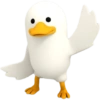
👋 Wing Wave
A duck waving hello with one wing raised. For greeting, saying hi, or casual friendliness.
-

📣 Protest Duck
A duck holding a blank sign and shouting for attention. For complaints, demands, or dramatic announcements.
-
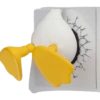
💥 Cracked Duck
A duck stuck through a cracked wall, looking wrecked. For failure, exhaustion, or being completely done.
-
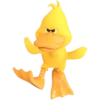
😡 Angry Duck
A fierce duck stomping with an angry expression. For irritation, anger, or dramatic displeasure.
-

🌧️ Rainy Mood
A cute duck in a raincoat, ready for wet weather. For gloomy days, wet weather, or gentle sadness.
-

🍽️ Serving Duck
A duck holding a plate with a big, eager expression. For offering food, help, or exaggerated enthusiasm.
-

😎 Cool Point
A duck in sunglasses making a confident hand gesture. For approval, agreement, or cool confidence.
-

🧁 Sweet Tooth Duck
A duck holding a cupcake, looking delighted. For cravings, treats, or cheerful indulgence.
-
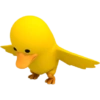
😬 Little Flap
A duck flapping its wings while looking downward. For nervousness, awkwardness, or tiny dramatic energy.
-

🎵 Ukulele Duck
A duck in sunglasses playing a small guitar with flair. For music, celebration, or playful performance.
-

🤓 Nerd Duck
A duck with glasses and a clever, wide-eyed expression. For smart jokes, awkward facts, or geeky replies.
-

🛁 Rubber Duck
A classic bath duck with a simple, glossy look. For lighthearted, toy-like, or bath-time vibes.
-

🟡 Round Duck
A very round duck with a cheerful, toy-like look. For adorable, compact, or squishy reactions.
-

👀 Peeking Duck
A duck peeking over the edge with a calm stare. For curiosity, quiet checking, or subtle reactions.
-

👍 Thumbs Up Duck
A duck with sunglasses giving a thumbs-up. For approval, success, or friendly support.
-

🦆 Floaty Duck
A cute duck floating like a toy on a stand. For cute status, playful display, or standing out.
-

🗣️ Chatty Duck
A duck in sunglasses talking animatedly with an open wing. For chatter, jokes, or long-winded replies.
-

👍 White Duck
A white duck in sunglasses giving a thumbs-up. For clean approval, calm confidence, or a positive reply.
Download and Install on WhatsApp
The Sticker Maker app is necessary to install this sticker pack on your WhatsApp. If you don't have it, download it from: Google Play Store and App Store. Once you have it on your phone, follow these instructions:
- Download the sticker file we provide below (it has the .wastickers extension). Locate the downloaded file on your mobile and tap it. Your device will ask you which application you want to open it with; select Sticker Maker. The app will automatically recognize the file as a new sticker pack.
- Once you see the pack inside Sticker Maker, just press the button that says "Add to My Library", then "Add to WhatsApp" and that's it! Your new stickers will be available for use in all your WhatsApp conversations.
Installation on WhatsApp with Sticker.ly
An easy way to add this pack is through the Sticker.ly app. If you don't have it yet, download it from: Google Play Store and App Store. Then choose one of these two simple methods:
- With Direct Link: Simply tap this link to the pack DY40MU. If you have Sticker.ly installed, you will immediately see the stickers in the app.
- Using the Pack Code: If you prefer, you can copy the "pack code" by tapping here: and paste it into the search bar inside the Sticker.ly app.
Once inside Sticker.ly, confirm the action by tapping "Add to WhatsApp" and the stickers will be instantly sent to your WhatsApp app.