

Lagertha-Vikings
📦 'Lagertha-Vikings' pack mein 12 stickers hain share karne ke liye ready. WhatsApp par install karne ke liye free download.
-

⚔️ Battle Charge
Lagertha charges with sword drawn and a green Viking shield. Use when charging ahead or refusing to retreat.
-
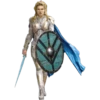
🛡️ Silver Armor
Lagertha in shining silver armor with a flowing blue cape. For a powerful, heroic entrance or moment of glory.
-

😤 Battle Wounds
Bloodied and fierce, Lagertha peeks from behind her shield. After a hard fight, when you're battered but unbeaten.
-

😠 Fierce Stare
Close-up of Lagertha with braided hair and a stern gaze. When you mean business and want a serious look.
-

⚔️ Ready to Fight
Lagertha stands ready with sword and teal round shield. Calm before the storm, fully prepared for what's next.
-

👑 Viking Queen
Lagertha in royal dress, gold jewelry, and a fur cloak. For elegant, queenly moments or quiet authority.
-

😠 Deadly Focus
Intense Lagertha leans in, gripping her sword tightly. When you're locked in and ready to strike.
-

🛡️ Dark Shield
Lagertha stands firm with a dark round shield and sword. For a strong, grounded, no-nonsense stance.
-

👀 Backward Glance
Lagertha looks back over her shoulder in chainmail. When glancing back at someone with intensity.
-

⚔️ Raised Sword
Lagertha raises her sword, ready to strike first. Starting a fight or making a bold threat.
-

⚔️ Face My Blade
Lagertha points her sword at you beneath the Vikings title. Direct challenge, confrontation, or calling someone out.
-

🎨 Painted Portrait
Artistic painted portrait of Lagertha with fierce eyes. For a dramatic, fan-art style tribute to the heroine.
WhatsApp par download aur install karein
Is sticker pack ko apne WhatsApp par install karne ke liye Sticker Maker app zaroori hai. Agar aapke paas nahi hai, to yahan se download karein: Google Play Store aur App Store. Phone mein app aa jaane ke baad ye steps follow karein:
- Neeche di gayi sticker file download karein (iska extension .wastickers hai). Download hui file ko apne mobile mein dhoondhein aur us par tap karein. Aapka phone poochega ki ise kis app se kholna hai; Sticker Maker chunein. App is file ko automatically naye sticker pack ke roop mein pehchaan lega.
- Jab pack Sticker Maker mein dikh jaye, to "Meri library mein add karein" wala button dabayein, phir "WhatsApp mein add karein", bas ho gaya! Aapke naye stickers aapki saari WhatsApp chats mein use ke liye ready honge.























