

Lagertha-Vikings
📦 The 'Lagertha-Vikings' pack includes 12 stickers ready to share. Free download to install on WhatsApp.
-

⚔️ Battle Charge
Lagertha charges with sword drawn and a green Viking shield. Use when charging ahead or refusing to retreat.
-
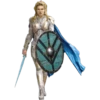
🛡️ Silver Armor
Lagertha in shining silver armor with a flowing blue cape. For a powerful, heroic entrance or moment of glory.
-

😤 Battle Wounds
Bloodied and fierce, Lagertha peeks from behind her shield. After a hard fight, when you're battered but unbeaten.
-

😠 Fierce Stare
Close-up of Lagertha with braided hair and a stern gaze. When you mean business and want a serious look.
-

⚔️ Ready to Fight
Lagertha stands ready with sword and teal round shield. Calm before the storm, fully prepared for what's next.
-

👑 Viking Queen
Lagertha in royal dress, gold jewelry, and a fur cloak. For elegant, queenly moments or quiet authority.
-

😠 Deadly Focus
Intense Lagertha leans in, gripping her sword tightly. When you're locked in and ready to strike.
-

🛡️ Dark Shield
Lagertha stands firm with a dark round shield and sword. For a strong, grounded, no-nonsense stance.
-

👀 Backward Glance
Lagertha looks back over her shoulder in chainmail. When glancing back at someone with intensity.
-

⚔️ Raised Sword
Lagertha raises her sword, ready to strike first. Starting a fight or making a bold threat.
-

⚔️ Face My Blade
Lagertha points her sword at you beneath the Vikings title. Direct challenge, confrontation, or calling someone out.
-

🎨 Painted Portrait
Artistic painted portrait of Lagertha with fierce eyes. For a dramatic, fan-art style tribute to the heroine.
Download and Install on WhatsApp
The Sticker Maker app is necessary to install this sticker pack on your WhatsApp. If you don't have it, download it from: Google Play Store and App Store. Once you have it on your phone, follow these instructions:
- Download the sticker file we provide below (it has the .wastickers extension). Locate the downloaded file on your mobile and tap it. Your device will ask you which application you want to open it with; select Sticker Maker. The app will automatically recognize the file as a new sticker pack.
- Once you see the pack inside Sticker Maker, just press the button that says "Add to My Library", then "Add to WhatsApp" and that's it! Your new stickers will be available for use in all your WhatsApp conversations.























