

Christmas Puppies
📦 A collection of Christmas-themed stickers featuring various dogs dressed in holiday attire with humorous and festive text. Use to add fun and holiday cheer to your chats during the Christmas season. 'Christmas Puppies' pack mein 16 stickers hain share karne ke liye ready. WhatsApp par install karne ke liye free download. In stickers ke phrases Spanish mein hain.
-

🎅🎄🐶 Merry Christmas
A puppy wearing a Santa hat, with text saying 'Feliz Navidad'. Use to wish someone a Merry Christmas.
-

🎅🎉🐶 And Happy New Year
A dog wearing a Santa hat, with text saying 'Y feliz Año Nuevo'. Use to wish a happy new year.
-
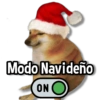
🎅🔛🐶 Christmas Mode On
A Shiba Inu wearing a Santa hat, with text saying 'Modo Navideño ON'. Use when getting into the Christmas spirit.
-

🎅👃🐶 Smells like Christmas
A dog wearing a Santa hat, with its nose up, with text saying 'Huele, huele a Navidad'. Use when feeling the atmosphere of Christmas.
-

🎄💪🐶 Christmas with Attitude
A bulldog in antlers and a green harness, looking assertive, with text saying 'Navidad Con toda la actitud'. Use when approaching Christmas boldly.
-

🎅🎁🐶 Wrap Yourself
A small dog in a Santa hat, with text saying 'Vete envolviendo q te pedí para Navidad'. Use humorously when someone is your Christmas gift.
-

🎅🛍️🐶 Ready for Shopping
A small dog wearing a Santa hat and outfit, with text saying 'Estoy listo para las compras de Navidad'. Use when preparing for Christmas shopping.
-

🎃🎄🐶 Preparing for Christmas
A puppy in a red and white outfit resembling a reindeer, with text saying 'Ya paso jaloguin, ahora nos alistamos para el Merricrismas'. Use when transitioning from Halloween to Christmas season.
-

🎄🐶 Wish You a Merry Christmas
A pug dressed like a Christmas tree, with text saying 'Wiwichu a mecrisma'. Use as a playful Christmas greeting.
-

🎅💸🐶 Happy Consumerism
A German Shepherd wearing a Santa hat, with text saying 'Feliz consumismo y prosperas deudas nuevas'. Use humorously when acknowledging holiday spending.
-

🎄😒🐶 I Hate Christmas
A husky with antlers and a scarf, looking displeased, with text saying 'Odio la Navidad'. Use when you're not a fan of Christmas.
-

🎁🐶 No Gift for You
A pug dressed in a red polka dot blanket with antlers, with text saying 'Para ti no hay regalo'. Use when someone won't receive a gift.
-

🎄📸🐶 Christmas Moment
A corgi with antlers and holding a Christmas ornament, with text saying '*momento Navideño*'. Use when capturing a special Christmas moment.
-

🎉🎄🐶 Merry Christmas and Happy New Year
A dog wearing antlers and a red bow, with text saying 'Feliz Navidad y año Nuevo'. Use to send wishes for both Christmas and New Year.
-

🎅🌟🐶 Christmas Eternal
A dog with a Santa hat and gift bows, looking hopeful, with text saying 'La navidad debería ser eterna'. Use when wishing Christmas would last forever.
-
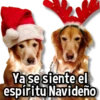
Ya se siente el espíritu Navideño
WhatsApp par download aur install karein
Is sticker pack ko apne WhatsApp par install karne ke liye Sticker Maker app zaroori hai. Agar aapke paas nahi hai, to yahan se download karein: Google Play Store aur App Store. Phone mein app aa jaane ke baad ye steps follow karein:
- Neeche di gayi sticker file download karein (iska extension .wastickers hai). Download hui file ko apne mobile mein dhoondhein aur us par tap karein. Aapka phone poochega ki ise kis app se kholna hai; Sticker Maker chunein. App is file ko automatically naye sticker pack ke roop mein pehchaan lega.
- Jab pack Sticker Maker mein dikh jaye, to "Meri library mein add karein" wala button dabayein, phir "WhatsApp mein add karein", bas ho gaya! Aapke naye stickers aapki saari WhatsApp chats mein use ke liye ready honge.
Sticker.ly se WhatsApp par install karein
Is pack ko add karne ka ek aasan tareeka hai Sticker.ly app. Agar aapke paas abhi tak nahi hai, to yahan se download karein: Google Play Store aur App Store. Phir in do aasan tareekon mein se ek chunein:
- Direct link se: Bas pack ke is link par tap karein: HW2OHS. Agar aapke paas Sticker.ly install hai, to stickers turant app mein dikh jayenge.
- Pack code se: Chahein to yahan tap karke "pack code" copy karein: aur use Sticker.ly app ke search bar mein paste kar dein.
Sticker.ly mein pahunchne ke baad "WhatsApp mein add karein" par tap karke confirm karein, aur stickers turant aapke WhatsApp app mein bhej diye jayenge.























