Sticker Combo #2 🧉
📦 A humorous and diverse pack of stickers with witty comments and fun illustrations. Perfect for lively conversations. Ideal for spicing up digital conversations with humor and sarcasm. The 'Sticker Combo #2 🧉' pack includes 15 stickers fun and expressive. Free download to install on WhatsApp. These stickers contain phrases in Spanish.
-

🏆 Oscar for Victim Role
An Oscar statue with the text 'Deberían darte un Oscar por tu papel de víctima'. Used to sarcastically comment on someone's dramatization.
-

⚰️ Died Ignored
A tombstone with blue checkmarks and the text 'Murió ignorado'. Used when someone is overlooked or ignored.
-

🐱 Loading Cat
A cat with a loading symbol above its head. Used when waiting or when something is taking time to load.
-

🙏 I Agree
A religious figure with clouds and the text 'Si quiero'. Used to express agreement or willingness.
-

✝️ Lying is a Sin
A religious figure with the text 'Mentir es pecado'. Used to remind someone that lying is morally wrong.
-

🐶 It All Went Wrong
A puppy with a gas tank and a blowtorch with the text 'Se pudrió todo'. Used to indicate that a situation has become chaotic or problematic.
-
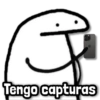
📱 I Have Screenshots
A simple character holding a smartphone with the text 'Tengo capturas'. Used when you have evidence or proof in the form of screenshots.
-
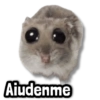
🐹 Help Me!
A small creature with big eyes and the text 'Aiudenme'. Used when you need assistance or help.
-

🤔 Something's Up with You?
A purple animated character with text 'Te falla no?' Used to question someone's behavior or actions.
-

😮 Surprised Cat
A cat wearing a yellow conical hat with the text 'Calajo'. Used to express surprise or shock.
-

🤖 Do I Look Like ChatGPT?
A symbol resembling AI with the text 'Me viste con cara de llamarme ChatGPT?' Used when someone expects a lot of information or knowledge from you.
-

😺 Coffee for Gossip?
A cat with a cup and a hand pouring coffee with the text 'Café? para el chisme'. Used when asking someone if they want coffee while discussing gossip.
-

👀 Gossip Alert
Two wide eyes with the text 'Ya me enteré del chisme' below them. Used when you are aware of some gossip.
-
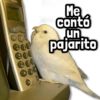
🐦 Bird Told Me
A bird near a phone with the text 'Me contó un pajarito'. Used to imply you heard something secretly or unofficially.
-

😅 Not to Gossip, But...
A smiling emoji waving with the text 'No es por chusma, peero...' Used to introduce gossip with a light-hearted tone.
Download and Install on WhatsApp
The Sticker Maker app is necessary to install this sticker pack on your WhatsApp. If you don't have it, download it from: Google Play Store and App Store. Once you have it on your phone, follow these instructions:
- Download the sticker file we provide below (it has the .wastickers extension). Locate the downloaded file on your mobile and tap it. Your device will ask you which application you want to open it with; select Sticker Maker. The app will automatically recognize the file as a new sticker pack.
- Once you see the pack inside Sticker Maker, just press the button that says "Add to My Library", then "Add to WhatsApp" and that's it! Your new stickers will be available for use in all your WhatsApp conversations.
Installation on WhatsApp with Sticker.ly
An easy way to add this pack is through the Sticker.ly app. If you don't have it yet, download it from: Google Play Store and App Store. Then choose one of these two simple methods:
- With Direct Link: Simply tap this link to the pack 8VRI9O. If you have Sticker.ly installed, you will immediately see the stickers in the app.
- Using the Pack Code: If you prefer, you can copy the "pack code" by tapping here: and paste it into the search bar inside the Sticker.ly app.
Once inside Sticker.ly, confirm the action by tapping "Add to WhatsApp" and the stickers will be instantly sent to your WhatsApp app.
Use on Telegram
For Telegram users, installing a sticker pack is a native and extremely simple process. Just follow this link that will take you to Telegram: stickerly_8VRI9O_by_stickerly_official_bot. When the app opens, you will instantly see the pack and can add it to your library, without the need for third-party apps.