Romantic Kittens
📦 A pack of stickers featuring adorable cats with romantic themes, including hearts and roses. Perfect for expressing love, affection, and romantic emotions in a playful and cute way. The 'Romantic Kittens' pack includes 10 stickers ready to share. Free download to install on WhatsApp.
-

🐱 Wide-Eyed Cat with Hearts
A cat with wide eyes and pink hearts above its head. Used to express amazement and charm.
-

😊 Blushing Cat with Hearts
A cat with pink cheeks surrounded by pink hearts. Used to express shyness and affection.
-

🐱 Adoring Cat with Hearts
A cute cat resting its head with pink hearts surrounding it. Used to express affection and fondness.
-


😯 Startled Cat with Hearts
A cat with a surprised expression and pink hearts overhead. Used to express surprise and affection.
-

🐱 Excited Cat with Hearts
A black and white cat looking ecstatic surrounded by pink hearts. Used to express excitement and enthusiasm.
-

🐱 Blushing Cat with Hearts
A blushing cat with hearts in the background. Used to show affection and bashfulness.
-

🌹 Kitten with a Rose
A tiny kitten holding a rose in its paw. Used to express romance and sweetness.
-

🌹 Cat with Rose and Timer
A cat standing up holding a rose and an hourglass. Used to express romance and time-sensitive emotions.
-
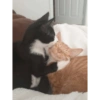
💕 Cuddling Cats
Two cats cuddling together, one orange and one black-and-white. Used to show affection and togetherness.
-

🐱 Playful Cat with Red Hearts
A playful cat lying upside down with red hearts surrounding it. Used to express playfulness and affection.
Download and Install on WhatsApp
The Sticker Maker app is necessary to install this sticker pack on your WhatsApp. If you don't have it, download it from: Google Play Store and App Store. Once you have it on your phone, follow these instructions:
- Download the sticker file we provide below (it has the .wastickers extension). Locate the downloaded file on your mobile and tap it. Your device will ask you which application you want to open it with; select Sticker Maker. The app will automatically recognize the file as a new sticker pack.
- Once you see the pack inside Sticker Maker, just press the button that says "Add to My Library", then "Add to WhatsApp" and that's it! Your new stickers will be available for use in all your WhatsApp conversations.
Installation on WhatsApp with Sticker.ly
An easy way to add this pack is through the Sticker.ly app. If you don't have it yet, download it from: Google Play Store and App Store. Then choose one of these two simple methods:
- With Direct Link: Simply tap this link to the pack SQPOD8. If you have Sticker.ly installed, you will immediately see the stickers in the app.
- Using the Pack Code: If you prefer, you can copy the "pack code" by tapping here: and paste it into the search bar inside the Sticker.ly app.
Once inside Sticker.ly, confirm the action by tapping "Add to WhatsApp" and the stickers will be instantly sent to your WhatsApp app.
Use on Telegram
For Telegram users, installing a sticker pack is a native and extremely simple process. Just follow this link that will take you to Telegram: stickerly_SQPOD8_by_stickerly_official_bot. When the app opens, you will instantly see the pack and can add it to your library, without the need for third-party apps.