Anomali
📦 The 'Anomali' pack includes 20 stickers for any conversation. Free download to install on WhatsApp.
-

woiiii lagi santai kawann
-

ang ang ang ang ang ang
-
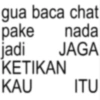
gua baca chat pake nada jadi JAGA KETIKAN KAU ITU
-

izin off ketua mau sambat A
-
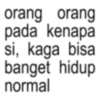
orang orang pada kenapa si, kaga bisa banget hidup normal
-

Barang siapa yang sabar maka itu bukan gw
-

beliau ini
-

barang siapa yang hemat, maka itu bukan gue.
-

kalo gue malu tuh
-
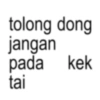
tolong dong jangan pada kek tai
-
ok maf
-

belum ada satu bulan, duitku sudah habis
-

Lengah dikit, duit habis
-
bisa gausah kayak monyet gk
-

apalah kocak
-
km sibuk bgt, emgny presiden kh?
-

Beliau sungguh lawak
-
aku kira sabar aja udah cukup, ternyata perlu ngamuk juga
-
y,bgs
-
jari siapa woi yang ngetik itu
Download and Install on WhatsApp
The Sticker Maker app is necessary to install this sticker pack on your WhatsApp. If you don't have it, download it from: Google Play Store and App Store. Once you have it on your phone, follow these instructions:
- Download the sticker file we provide below (it has the .wastickers extension). Locate the downloaded file on your mobile and tap it. Your device will ask you which application you want to open it with; select Sticker Maker. The app will automatically recognize the file as a new sticker pack.
- Once you see the pack inside Sticker Maker, just press the button that says "Add to My Library", then "Add to WhatsApp" and that's it! Your new stickers will be available for use in all your WhatsApp conversations.
Installation on WhatsApp with Sticker.ly
An easy way to add this pack is through the Sticker.ly app. If you don't have it yet, download it from: Google Play Store and App Store. Then choose one of these two simple methods:
- With Direct Link: Simply tap this link to the pack 08WHUZ. If you have Sticker.ly installed, you will immediately see the stickers in the app.
- Using the Pack Code: If you prefer, you can copy the "pack code" by tapping here: and paste it into the search bar inside the Sticker.ly app.
Once inside Sticker.ly, confirm the action by tapping "Add to WhatsApp" and the stickers will be instantly sent to your WhatsApp app.
Use on Telegram
For Telegram users, installing a sticker pack is a native and extremely simple process. Just follow this link that will take you to Telegram: stickerly_08WHUZ_by_stickerly_official_bot. When the app opens, you will instantly see the pack and can add it to your library, without the need for third-party apps.